Multimodal preflight
for AI APIs. Automatic.
SHIFT sits between your app and the model API. It inspects, evaluates, and transforms images so every request is valid, optimized, and tuned to your cost/quality preference.
The problem with raw image payloads
AI model APIs have strict constraints on image inputs. Violating them wastes tokens, causes hard failures, or crashes sessions.
Oversized images
A 4000x3000 screenshot dropped into a prompt consumes massive tokens. Anthropic charges per-pixel; OpenAI uses tiles. Either way, you're paying for resolution the model can't use.
~1,568 tokens wastedHard 400 errors
Send an SVG, BMP, or TIFF to a model API and you get a 400 error. The API rejects the request outright. Your agent retries, wastes more tokens, and often gives up.
Session crashToken cost bloat
Multimodal tokens are expensive. Without optimization, a 30-min coding session with screenshots can burn through 50-100K tokens on images alone. Most of that is pure waste.
$2-5 per sessionBefore & After
See what SHIFT does to a real API request payload.
{
  "model": "gpt-4o",
  "messages": [{
    "role": "user",
    "content": [{
      "type": "image_url",
      "image_url": {
        "url": "data:image/png;base64,iVBORw0KGgo..."
      }
    }]      // 4000x3000 PNG, 42KB
  }]        // 1,568 Anthropic tokens
} // Exceeds provider limits{
"model": "gpt-4o",
"messages": [{
"role": "user",
"content": [{
"type": "image_url",
"image_url": {
"url": "data:image/png;base64,iVBORw0KGgo..."
}
}] // 1024x768 PNG, 17KB
}] // 1,082 Anthropic tokens (-31%)
} // All constraints metFour-stage pipeline
Every request passes through four stages. Each image is inspected, evaluated against provider rules, transformed, and slotted back in.
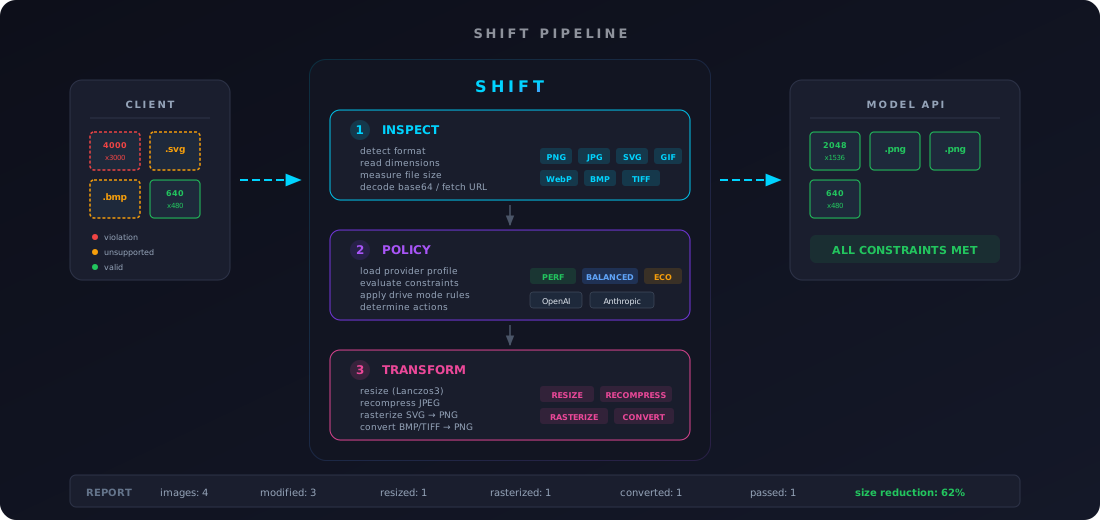
1. Inspect
Detect every image in the payload. Extract format via magic bytes, read dimensions, measure file size. Handles base64 data URIs, raw base64, and URL references.
2. Evaluate
Load the provider profile. Compare each image against constraints. Apply drive mode rules to determine actions: resize, recompress, convert, rasterize, or drop.
3. Transform
Execute actions with Lanczos3 filtering. Rasterize SVGs via resvg. Convert BMP/TIFF to PNG. Recompress bloated images to meet size limits.
4. Reconstruct
Rebuild the payload with optimized images slotted back into their original positions. Output a valid, provider-safe JSON request ready to send.
Token savings
Real numbers from the two major multimodal providers.
| Scenario | Before | After | OpenAI tokens | Anthropic tokens |
|---|---|---|---|---|
| 4000x3000 hero (balanced) | 4000x3000 | 2048x1536 | 765 → 765 | 1,568 → 1,568 |
| 4000x3000 hero (economy) | 4000x3000 | 1024x768 | 765 → 765 | 1,568 → 1,082 -31% |
| 1254x1254 icon (economy) | 1254x1254 | 1024x1024 | 765 → 765 | 1,568 → 1,430 -9% |
| SVG diagram → rasterized PNG | SVG | 512x256 PNG | 255 → 255 | 0 → 198 enabled |
Token estimates based on published provider formulas. OpenAI uses tile-based counting (512x512 tiles); Anthropic uses pixel-based (w×h/750, 1568px cap).
Three drive modes
Choose your optimization level per request.
Maximum fidelity
Minimal transforms. Only enforce hard provider limits (max dimension, max file size). Preserve original quality.
Smart optimization
Moderate optimization. Resize oversized images, recompress bloated files. Remove obvious waste while keeping quality.
Maximum savings
Aggressive optimization. Downscale everything to 1024px, drop excess images, minimize token usage at all costs.
Works with any AI agent
Plugin, proxy, middleware, or CLI — pick the integration that fits your stack.
Zero-config for OpenCode
Auto-starts the proxy on every OpenCode launch. No manual setup per session.
"plugins": ["@shift-preflight/opencode-plugin"]
Universal agent proxy
Transparent HTTP proxy for Claude Code, Codex CLI, Gemini CLI, Aider — any agent that accepts a base URL.
AI SDK drop-in
In-process middleware for any Vercel AI SDK app. Zero config, auto-detects provider.
Pipe & transform
Pipe any JSON payload through shift-ai directly. Works with any language or toolchain.
OpenCode plugin: @shift-preflight/opencode-plugin
·
Runtime package: @shift-preflight/runtime
·
Setup guide →
Install
Single Rust binary, zero dependencies. Pick your method.
Homebrew
Recommended for macOS/Linux
brew tap alohaninja/shift && brew install shift-ai
Quick install
curl one-liner
curl -fsSL https://raw.githubusercontent.com/alohaninja/shift/main/install.sh | sh
Cargo
From crates.io
cargo install shift-preflight-cli
AI Agent Skill
Teach your AI coding agent to use SHIFT automatically
npx skills add alohaninja/shift
Stop wasting tokens
on oversized images
One binary, three integration modes. Works with OpenAI, Anthropic, and Google out of the box.